📋 Table of Content:
- Project Overview
- System Architecture
- CI/CD Pipeline
- Infrastructure as Code (IaC)
- Third-Party Integrations
- Fixing 403/404 Errors in SPA Deployment
- Accessibility Compliance
Project Overview
This project was built for learning purposes and is inspired by a tutorial from Chris Blakely, with many custom-designed features.
System Architecture
This is a client-server (C/S) architecture project developed in TypeScript.
Frontend
- Built using React.js
- Styled with Tailwind CSS and Shadcn UI
- Hosted on AWS S3
- Served via AWS CloudFront to ensure low latency access
- Fronted by AWS WAF to protect the website’s endpoint
Backend
- Developed using Express.js
- Deployed to a multi-AZ EC2 cluster with an Application Load Balancer (ALB) for high availability
A diagram of the full architecture:

CI/CD Pipeline
A complete CI/CD pipeline was set up using AWS CodePipeline to automate:
- Code integration from GitHub
- Frontend and backend build processes
- Deployment to AWS environments

Infrastructure as Code (IaC)
All infrastructure on the cloud is provisioned using AWS CloudFormation. The templates are located in the cloudformation-template folder:
- Creates an AWS WAF Web ACL to protect the website
- Must be deployed in the us-east-1 region
Can be deployed to any region, it creates all necessary resources for the application, including:
Network (VPC)
- 1 VPC with:
- 3 public subnets
- 3 private subnets
- 1 Internet Gateway
- 3 NAT Gateways
- Route tables
Frontend Hosting
- 1 S3 bucket for hosting static frontend files
- 1 CloudFront distribution with Origin Access Control (OAC)
IAM Roles
- EC2 instance profile
- Elastic Beanstalk service role
Backend (Elastic Beanstalk)
- 1 Elastic Beanstalk Application
- 1 Elastic Beanstalk Environment, including:
- Application Load Balancer
- Auto Scaling Group
- 3 to 6 EC2 instances (t3.micro)
Database
- 1 Amazon DocumentDB cluster (instance-based)
- 3 db.t3.medium instances
- Custom security groups
You can deploy the templates using either the AWS CloudFormation console or the AWS CLI. The creation process might take up to 15 mins to complete.
Third-Party Integrations
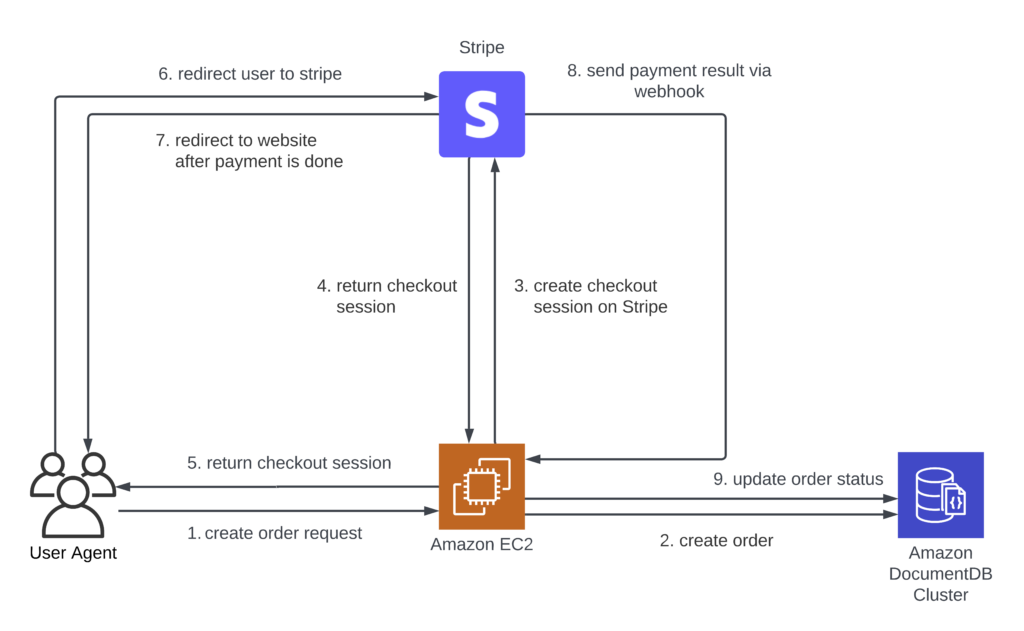
Stripe (Payment)
Stripe is used to handle online payments for customer orders.
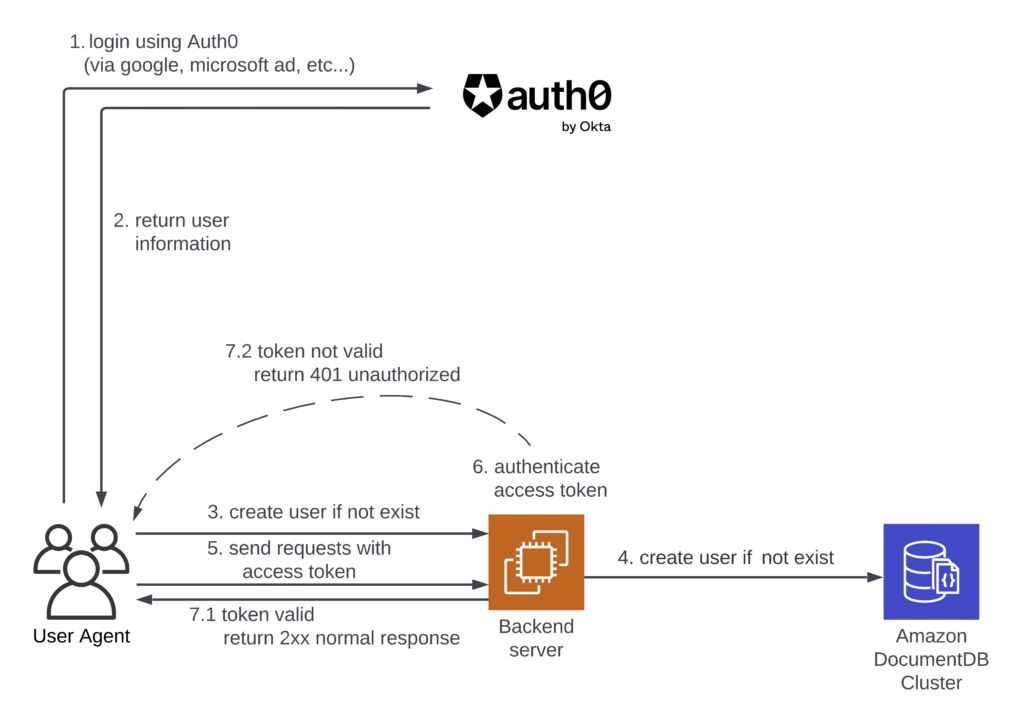
Auth0 (Authentication)
Auth0 manages user authentication and authorization.
It supports sign-up, sign-in, logout, and access control via JWTs.
Fixing 403/404 Errors in SPA Deployment
When deploying a SPA using react-router-dom to AWS S3 and CloudFront, navigating directly to nested routes (e.g., /about) can result in 403 or 404 errors.
Causes
S3 and CloudFront treat those routes as file paths, not as frontend routes.
Solutions Considered:
- Enable S3 Static Website Hosting, and set S3 error document to
index.html - Configure CloudFront custom error responses (403/404) to redirect to
/index.html - Use CloudFront Functions or Lambda@Edge for URL rewriting
This project implements the second solution (CloudFront custom error responses), which requires minimal time and effort while maintaining full functionality.
Reference 1: How to Resolve 403 Access Issues When Deploying a SPA on AWS with S3 and CloudFront
Reference 2: Solving the SPA Refresh Problem for React Apps Hosted on AWS S3 and CloudFront
Accessibility Compliance
This project is compliant with WCAG 2.1 Level AA, as required by the Accessibility for Manitobans Act (AMA).
- All pages were tested using axe DevTools to ensure accessibility best practices.
- The UI supports screen readers, keyboard navigation, and has sufficient color contrast.